
Profit & Loss and Balance Sheet Reporting
A company's financial reports must always be output in the currency of the country that the company is registered in. Therefore, the Tourplan Excel P&L and Balance Sheet Excel Reports are always produced in Base Currency.
These reports are able to be output in Transaction Currency and Branch Currency using special Excel reporting functions developed for the purpose, but naturally these can’t be included in the same P&L/Balance Sheet report which is output in base currency.
The example branch set up (AU, FJ, NZ) and multiple currencies (AUD, FJD, NZD, USD) that have been used to create the examples in this document mean that there is likely to be confusion if different currencies are used in the same report - for example, if a P&L report has some balances for a branch (e.g., NZ) which have been output in two different currencies (NZD & USD), then the totals in the report mean nothing. This scenario will likely occur when the getBalanceCurrency function is used. Advice can be obtained from the local Tourplan Office on possible report layouts which can be designed to suit client needs. There are limitations to what can be done.
Standard Reporting Functions
The standard function used in Excel to obtain the report balances is called =getBalance.
4 parameters are used in the function – account branch, account department, account number, and accounting period.
In a P&L/Balance Sheet report the cells don’t have figures in them, they have the function in them. In cell T3 of P&L report, the following function will be found:=getBalance($D3,$F3,$H3,T$2) * -1. This is telling the spreadsheet to return the balance of the account whose branch is in (hidden) cell D3, the department in (hidden) cell F3, the account number in cell H3 for the period in cell K2 and multiply it by -1 (to reverse the sign from a negative to a positive).
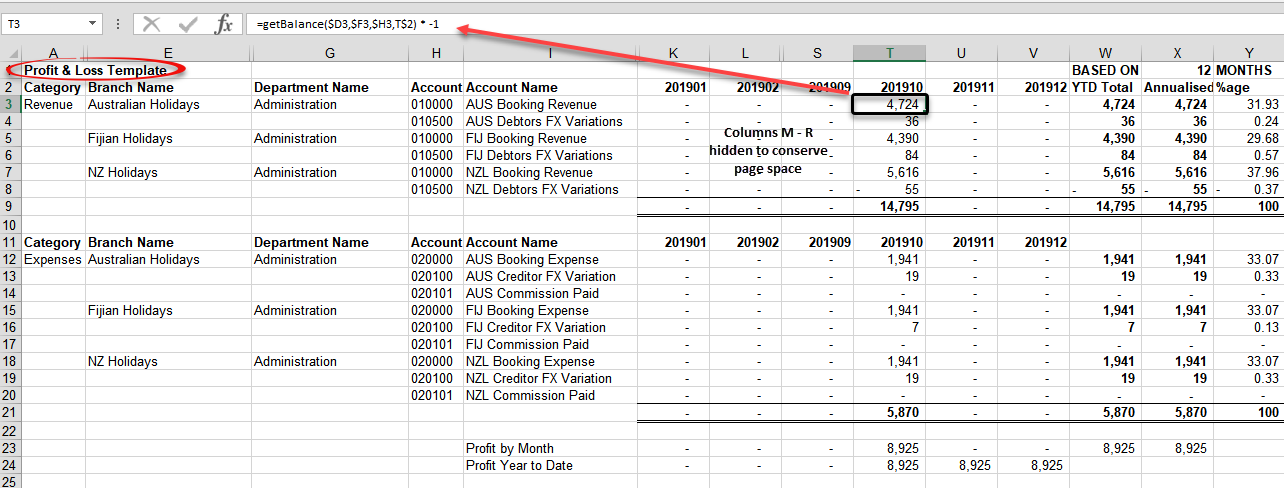
(The $ signs in the cell references are maintaining relativity – e.g., $D3 = always use column D to get the branch (the same for $F3 (dept) and $H3 (account)), and K$2 = always use Row 2 to get the accounting period.)
Additional Available Functions
The following additional functions are available:
1. getBalanceCurrency
This function returns the value of the transactions for the account and period in the Transaction Currency specified in the function.
=getBalanceCurrency(BR,DP,AC,CUR)
The parameters this function is expecting are the account Branch, Department, Account Number, Accounting Period and Currency Code
- =getBalancecurrency(NZ,AD,010000,201910,”NZD”)
will return the value of NZD currency transactions posting to the account in NZD.
- =getBalancecurrency(NZ,AD,010000,201910,”USD”)
will return the value of USD currency transactions posting to the account in USD.
2. getBalanceCurrencyYTD
This is much the same as =getBalanceCurrency, but will return the Year To Date balance of the account, (not the value of the transactions) as at the period end and the transaction currency specified in the function.
=getBalancecurrencyYTD(BR,DP,AC,PRD,”CUR”)
The parameters this function is expecting are the account Branch, Department, Account Number, Accounting Period and Currency Code.
- =getBalancecurrencyYTD(NZ,AD,010000,201910,”NZD”)
will return the balance of the account in NZD.
- =getBalancecurrencyYTD(NZ,AD,010000,201910,”USD”)
will return the balance of the account in NZD.
3. getBalanceBranch
This function returns the value of the transactions for the account and period in the currency and of the Branch specified in the function.
=getBalanceBranch(BR,DP,AC,PRD,”CUR”)
- =getBalanceBranch(NZ,AD,010000,201910,”NZD”)
will return the value of NZD currency transactions posting to the account in NZD.
- ==getBalanceBranch(NZ,AD,010000,201910,”USD”)
will return the value of USD currency transactions posting to the account in NZD.
4. getBalanceBranchYTD
This function is the same as getBalanceBranch, but returns the Year To Date Balance of the account (not the value of transactions) as at the period end in the Branch Currency specified in the function.
=getBalanceBranchYTD(BR,DP,AC,PRD,”CUR”)
- =getBalanceBranchYTD(NZ,AD,010000,201910,”NZD”)
will return the account balance of NZD currency transactions posting to the account in NZD.
- ==getBalanceBranchYTD(NZ,AD,010000,201910,”USD”)
will return the account balance of USD currency transactions posting to the account in NZD.
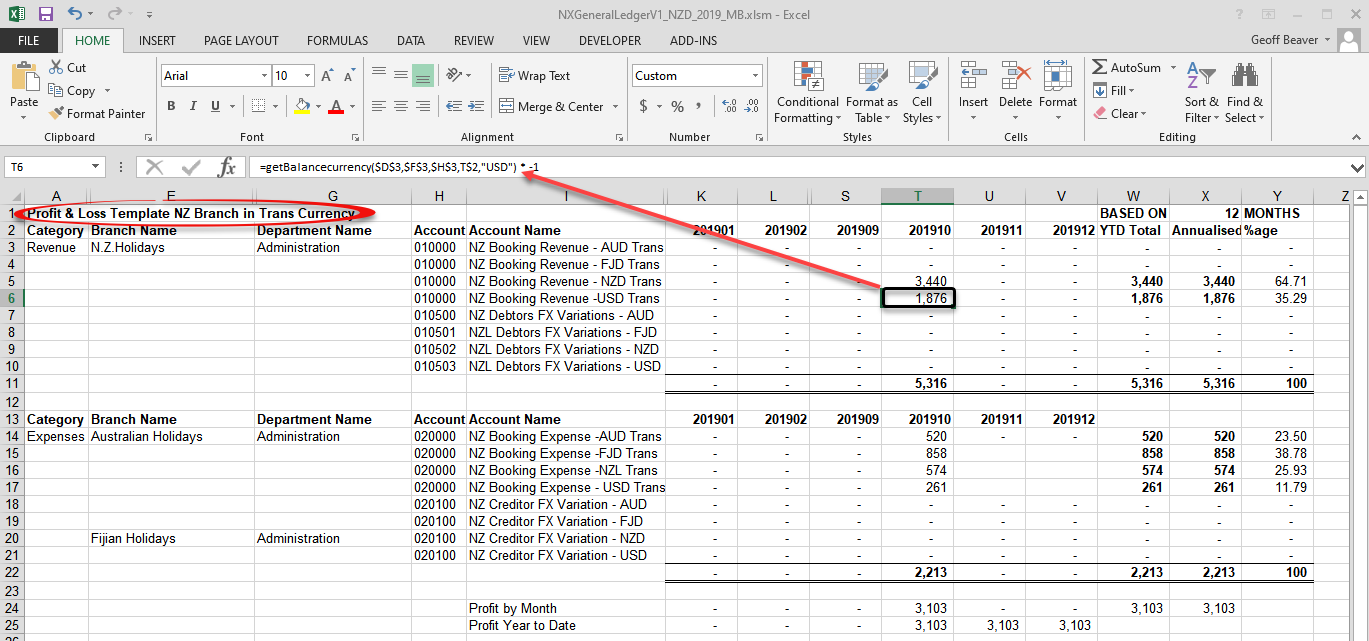
The Report Example above shows an example of the getBalancecurrency function used in a P&L Report for the NZ Branch.
Cell T5 has the function =getBalancecurrency($D$3,$F$3,$H$3,T$2,"NZD") * -1 which is returning the net of tax value of Invoices 48 & 49 (shown in Debtor NZAG01 (Branch Currency NZD)).
Cell T6 has the function = =getBalancecurrency($D6,$F6,$H6,T$2,"USD") * -1 which is returning the net of tax value of Invoices 54 & 55 (also shown in Debtor NZAG01 (Branch Currency NZD)).
The totals in Row 11 in this particular report are meaningless
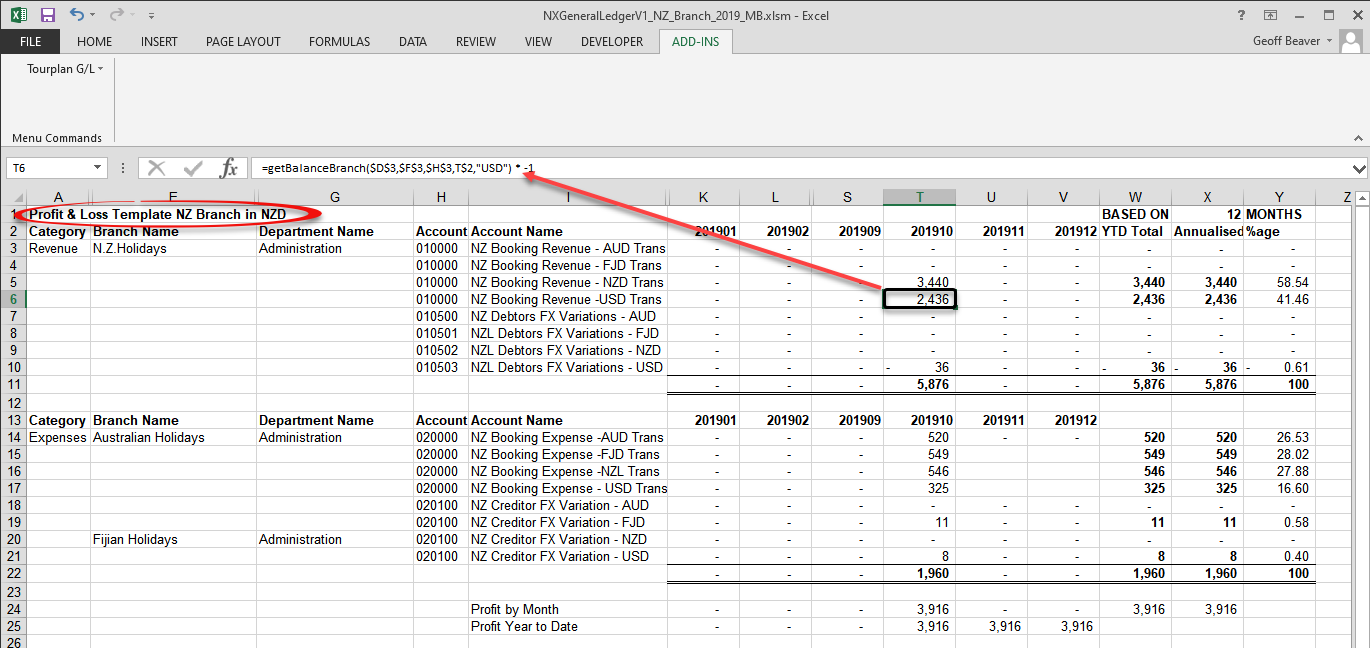
Report getBalanceBranch Example
The getBalanceBranch function always returns the values in Branch Currency. The currency code in the function is telling the function which transactions to select and convert.
There can be some benefit in including a Transaction Currency report in a suite of Branch Currency P&L Reports. Since the balances in the report are period transaction totals and the exchange rate could have changed during the period, a calculation can be done between the two reports to get the exchange rate used between the two total values. – e.g.:
=SUM('NZ BR P&L Tran Cur'!T5/'NZ BR P&L Branch Cur '!T5) = 1.00 (NZD in both reports)
=SUM('NZ BR P&L Tran Cur'!T6/'NZ BR P&L Branch Cur '!T6) = 0.77 (USD/NZD totals)