
Debtor & Creditor Transaction Processing
There is no change to the method of processing Debtor, Creditor or G.L. transactions. What needs some explanation is the changes to the transaction list screens and the way the values in those screens affect reporting.
NOTE: All exchange rates used in this document are examples only and do not reflect actual exchange rates on the dates they were used.
For ease of demonstration, the following applies for all of the Debtor & Creditor examples below:
- Each agent had 4 bookings created and the same services were put into all 12 bookings.
- All service currencies were the same as their supplier currencies - e.g., AU Supplier=$AUD, FJ Supplier=$FJD, NZ Supplier=$NZD.
- The services were: AU-Accommodation; AU-Non Accommodation; FJ-Accommodation; FJ-Non Accommodation;' NZ-Accommodation; NZ-Non Accommodation.
- The same costs were used across the services - e.g., AUD$220.00, FJD$220.00, NZD$220.00 etc.
- All bookings had their booking currency the same as the agent currency - AUAG01=$AUD; FJAG01=$FJD; NZAG01=$NZD
- The transaction screens below have had the transactions sorted by Item (i.e., Booking Reference) so that Invoice/Receipt transactions are grouped by booking. The default display is by transaction date descending.
- In the Debtors screens, the yellow highlighted transactions are those that balance to 0.00; the grey highlighted transactions are those invoices that do not balance to 0.00. The Creditors screens have not had the colours applied, since not all transactions display, so an accurate representation is not possible.
Debtors Transactions
The following are the transaction list screens of the three Debtors used in the generating of the Branch Level Accounting examples.
Debtor AUAG01 (Branch Currency AUD)
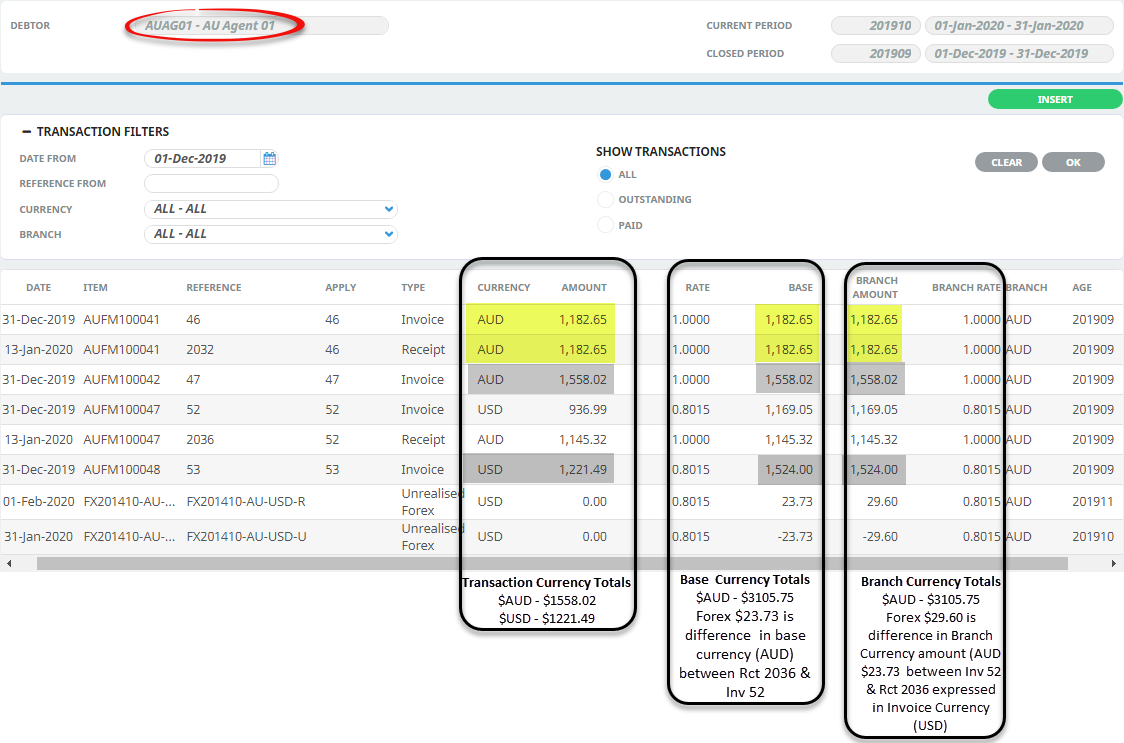
These balances can be viewed in the Debtor Balances screen. See Debtor AUAG01 Balances
Debtor FJAG01 (Branch Currency FJD)
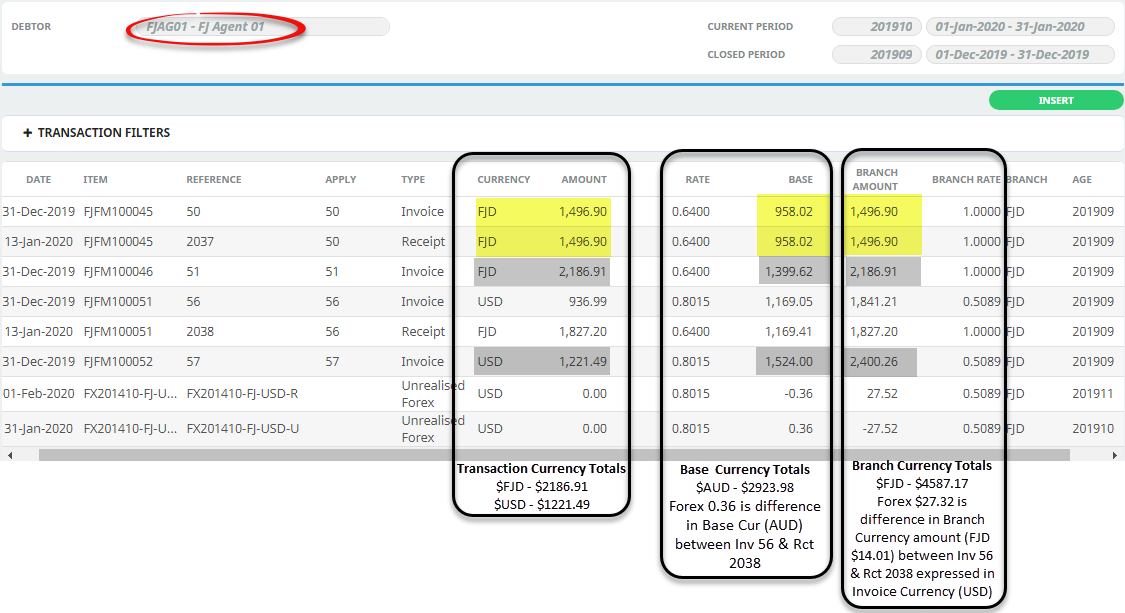
These balances can be viewed in the Debtor Balances screen. See Debtor FJAG01 (Branch Currency FJD).
Debtor NZAG01 (Branch Currency NZD)
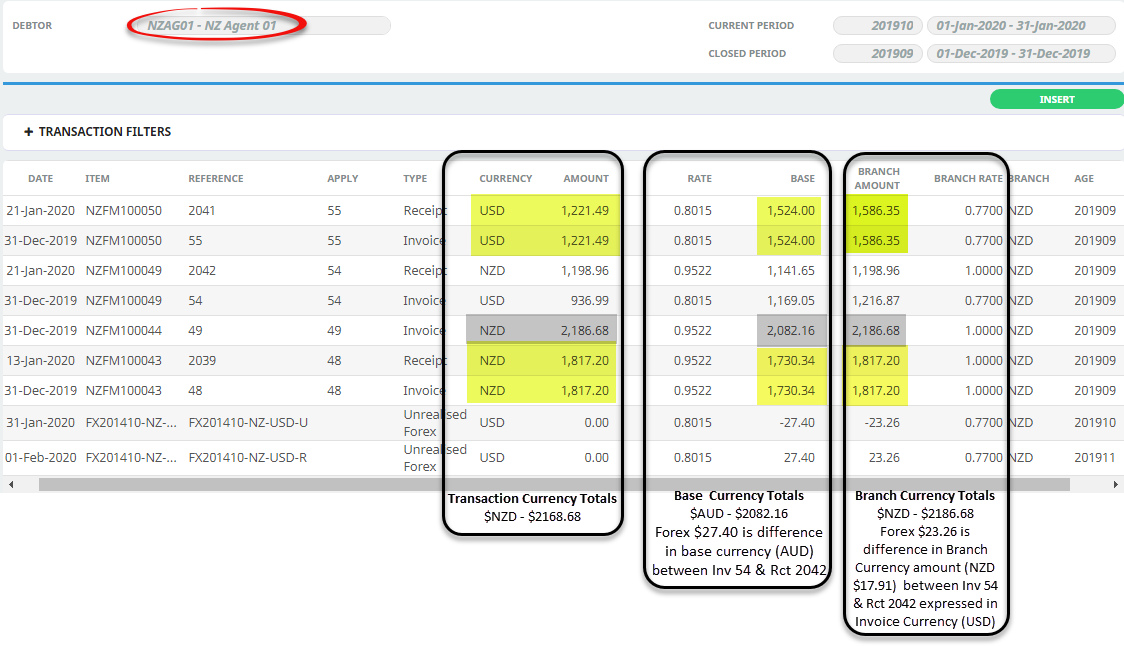
These balances can be viewed in the Debtor Balances screen. See Debtor NZAG01 (Branch Currency NZD).
The columns ‘Date’, ‘Item’, Reference’, ‘Apply’, 'Type', ‘Currency’, ‘Amount’, ‘Rate’, ‘Base’ and ‘Age’ are standard column headings. The columns ‘Branch' (Currency), Branch Rate’ and ‘Branch Amount’ relate to the Branch Currency amounts and are not displayed by default.
“Rate” is the exchange rate between the Transaction Currency and the system Base Currency.
"Branch Rate" is the exchange rate between the Transaction Currency and the Branch Currency.
The same columns are available in systems where Branch Level Accounting is not enabled, but the Branch Currency column may be blank. The “Branch Rate” will always be 1.0000 and the “Branch Amount” value will be the same as the Base Amount value.
Creditor Transactions
Again, there is no change to the method of processing transactions but the changes to the Creditors transaction list screen and the way the values in that screen affect reporting need explanation.
Below are the transaction list screens of the three creditors used in the generating of the Branch Level Accounting examples.
NOTE: Because of the number of transaction lines, the screens have been truncated to allow for the summaries to display. The summaries include all transactions, not just those displayed.
Creditor AUSU01 (Branch Currency AUD)
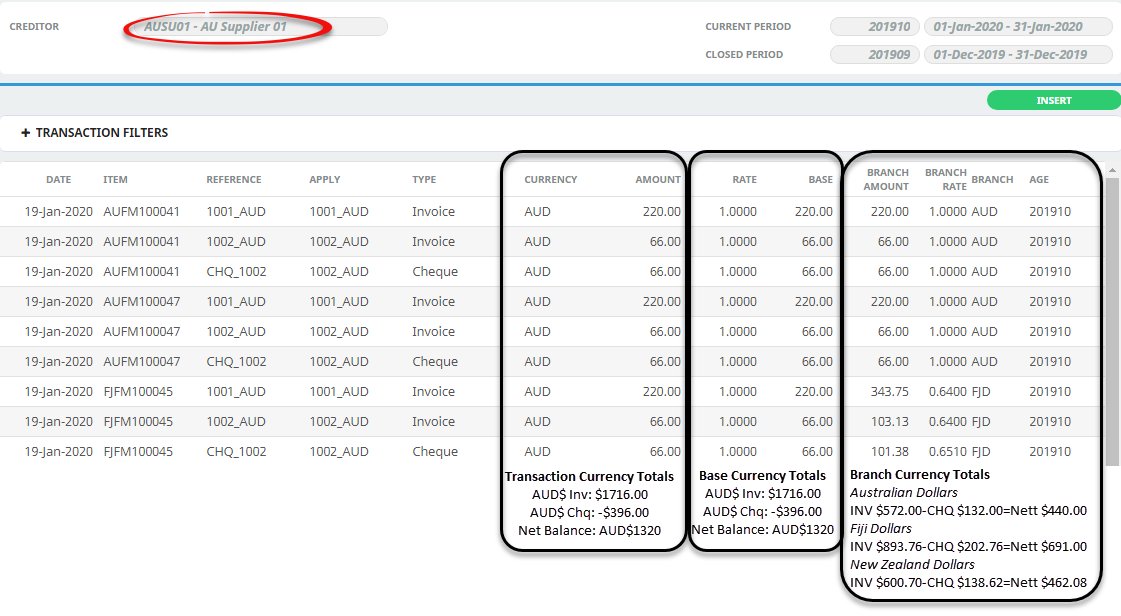
For creditor balances, see Creditor AUSU01 (Branch Currency AUD)
Creditor FJSU01 (Branch Currency FJD)
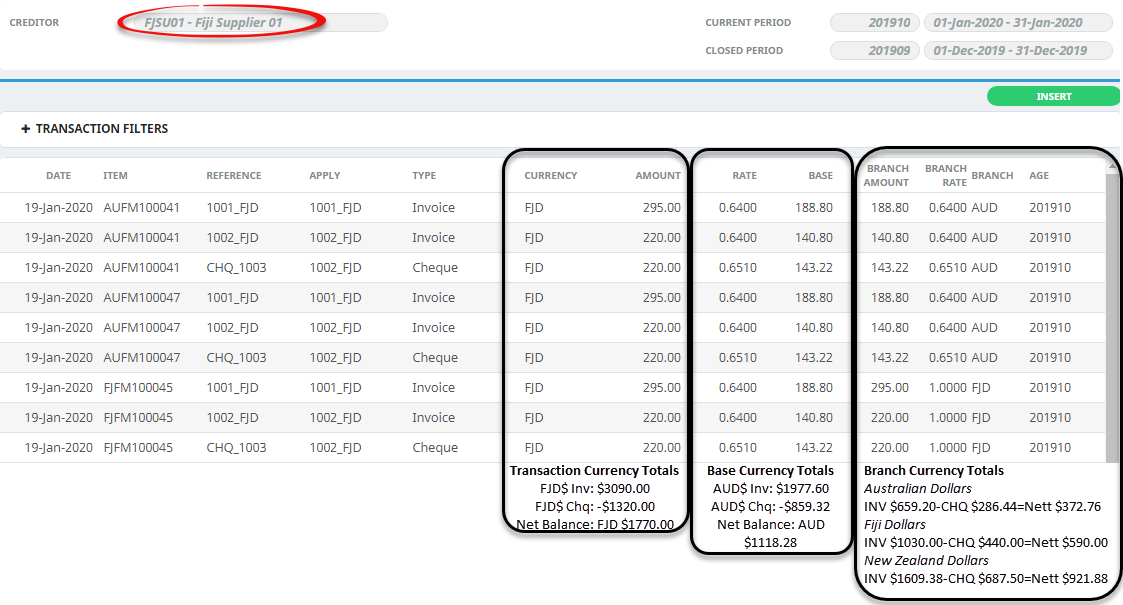
For Creditor balances, see Creditor FJSU01 (Branch Currency FJD)
Creditor NZSU01 (Branch Currency NZD)
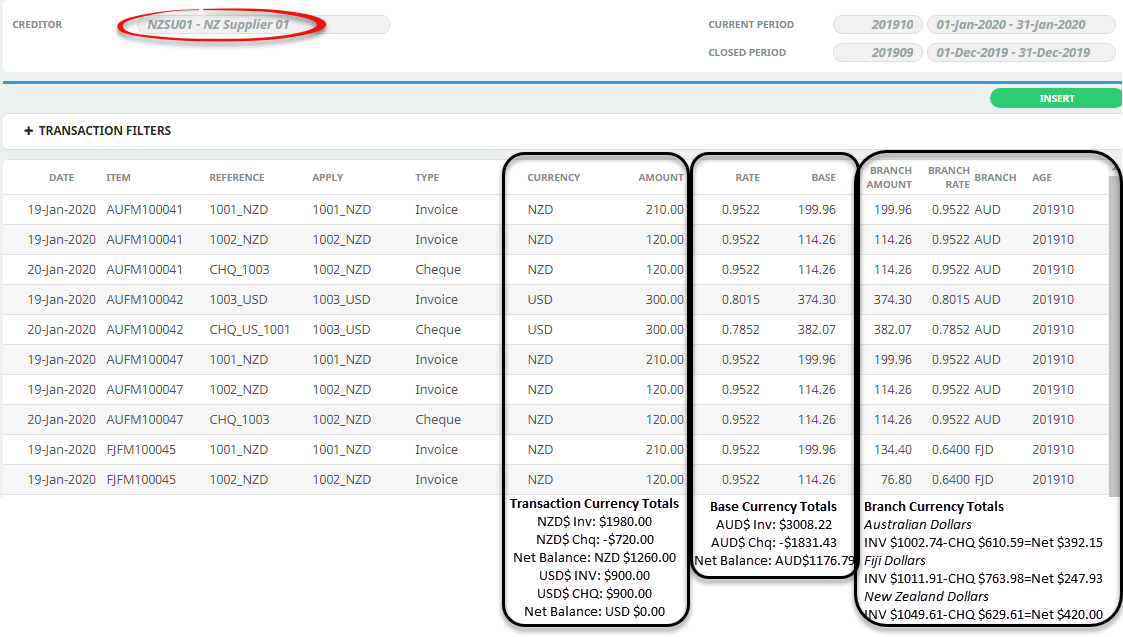
For Creditor balances, see Creditor NZSU01 (Branch Currency NZD)
The columns ‘Date’, ‘Item’, Reference’, ‘Apply’, ‘Tran’, ‘Currency’, ‘Amount’, ‘Rate’, ‘Base Amount’ and ‘Age’ are standard from previous versions of the system. The columns ‘Branch Currency‘, Branch Rate’ and ‘Branch Amount’ relate to the Branch Currency amounts and are not displayed by default.
It is important to note the difference in the two exchange rate columns in this screen.
“Rate” is the exchange rate between the Transaction Currency and the system Base Currency.
“Branch Rate” is the exchange rate between the Transaction Currency and the Branch Currency.
The same columns are available in systems where Branch Level Accounting is not enabled, but the Branch Currency column may be blank; the “Branch Rate” will always be 1.0000 and the “Branch Amount” value will be the same as the Base Amount value.