
There may be situations that you will need to do a bulk update of Assignment details, this could be a bulk update of assignment status for example.
Multiple Assignments can be selected, and updated in bulk. The procedure below describes how to update multiple assignments in bulk.
Bulk Update of Assignments
-
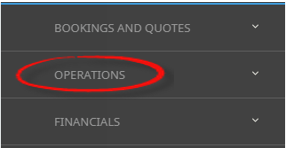
From the Home menu, select
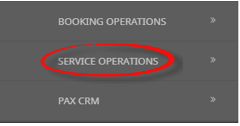
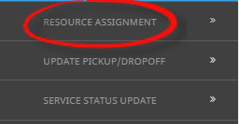
 Home > Operations > Service Operations > Resource Assignment.
- Click the Home Menu to expand it:

- Click the Operations menu option to expand it:

-
Click Service Operations menu option to expand it:

- Click Resource Assignment to open the Resource Assignment screen:

- Click the Home Menu to expand it:
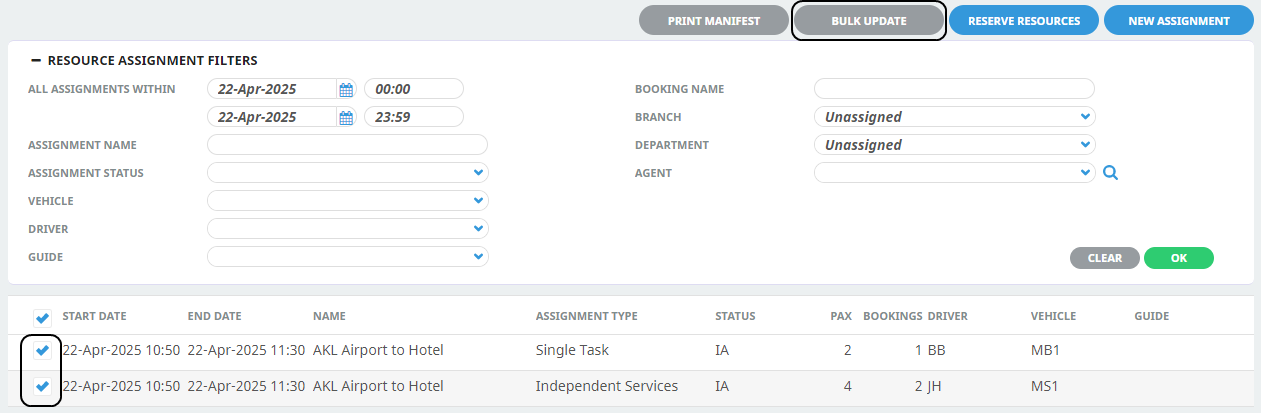
- Expand the Resource Assignment Filters by clicking the - Select the required filters to narrow the results of the resources already assigned.If you want to keep the changes, clickOK.


-
A list of existing Resource Assignments results will be returned, selection can be made by checking the Resource Assignment lines and clicking,Bulk Update.
-
On theUpdate Assignment check the required fields that are to be updated.
NOTE: Fields that can be updated are Assignment Status, Assignment Dates, Assignment Notes, checking the box next to the field will enable entry into the fields and allow updates to be made.The most common amendment will be updating the Assignment Status, or adding Assignment Notes.
In this example we have selected the Assignment Status check-box, we will update the status of these assignments to a Confirmed Assignment Status. The Assignment Dates and Assignment Notes will remain greyed out as we have not selected to update these fields.
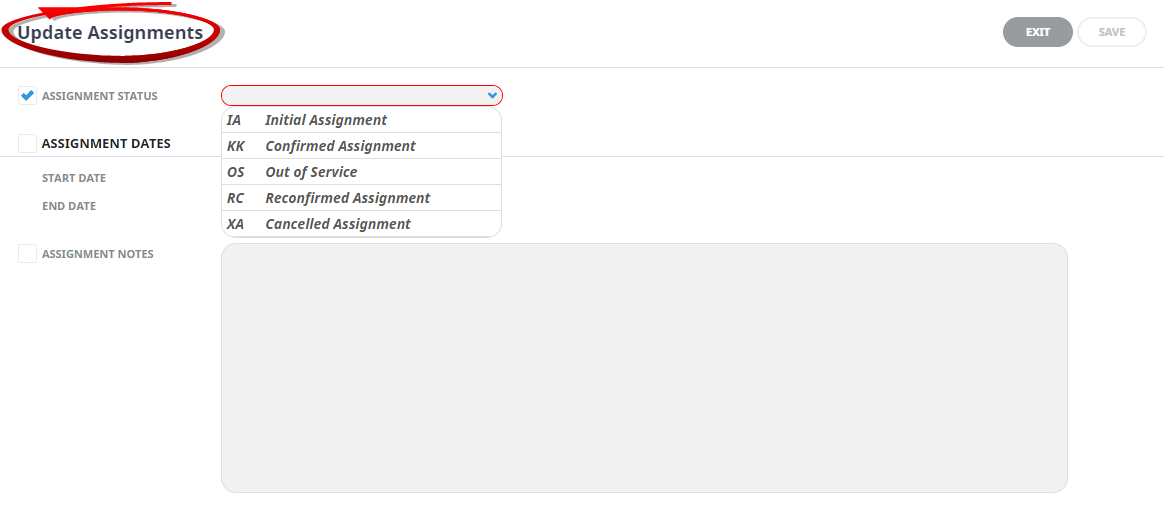
- Check the completed screen.
-
ClickSave to keep the changes.

-
ClickExit to discard any changes.

-
Ifsave was selected a summary of the number of successful operations updated will show, click OK.

-
TheResource Assignment screen will re-open.
In our example the Status of the assignments has been updated to KK.

- Continue updating Resource Assignments by clearing and re-entering filter requirements from procedure 3. Or if Bulk Update of Resource Assignments is no longer required. Exit the module.
About Filter Headings
All Assignments Within
A date or range of dates can be entered to filter for a specific date or range of dates.
NOTE: Assignment Category - This field is enabled if organisations are using multiple assignment categories to assign their services to more than one assignment.
Assignment Name
The name given to the assignment, results can locate specific assignments by name.
Assignment Status
Specific assignment status can be selected from a pre-defined list of status providing results for specific statuses.
Allocated Vehicles, Drivers and Guides
Drop down selection of available resources can be selected here, and any pre-selected resources will display, results can be filtered by Vehicle, Driver and or Guide.
Booking Name
Individual clients can be found by using the booking name filter.
Branch/Department
Bookings with specific booking branch or booking department can be found when filtering by Branch or Department.
Agent
Users can filter assignments by agents attached to bookings.
In this example we have narrowed the search by selecting a specific date. This will produce results for all assignments (inclusive) within the dates defined.

About Result Columns
Start Date/End Date
Assignment start/end date and time.
Name
The name given to the assignment.
Assignment Type
Single Task, Independent Service, or Hop on Hop off.
Assignment Status
Specific assignment status for the assignment.
Pax
Number of pax included in the assignment.
Bookings
Number of bookings included in the assignment.
Allocated Drivers, Vehicles and Guides
Resources assigned.
About Update Assignment Fields
Assignment Status
The selections available here have been pre-defined in Code Setup, this field shows the statuses of the assignment.
Start Date/End Date
The dates defined here will change the start date or end date of the assignments selected.
Assignment Notes
Note text can be entered and updated in bulk across multiple assignments.