
This is an additional tasks which can be enabled and would become the sixth task available in the Operations and Accounts Menu. The procedure described in this document allows users to view:
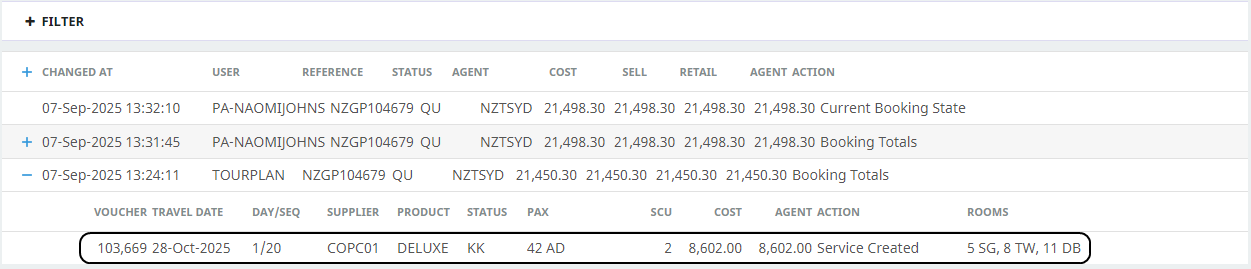
- A Change History user interface itemising various changes which have happened within the booking.
- Further service drill-down are available to show:
- The Tourplan User who made the change
- The time the change was made
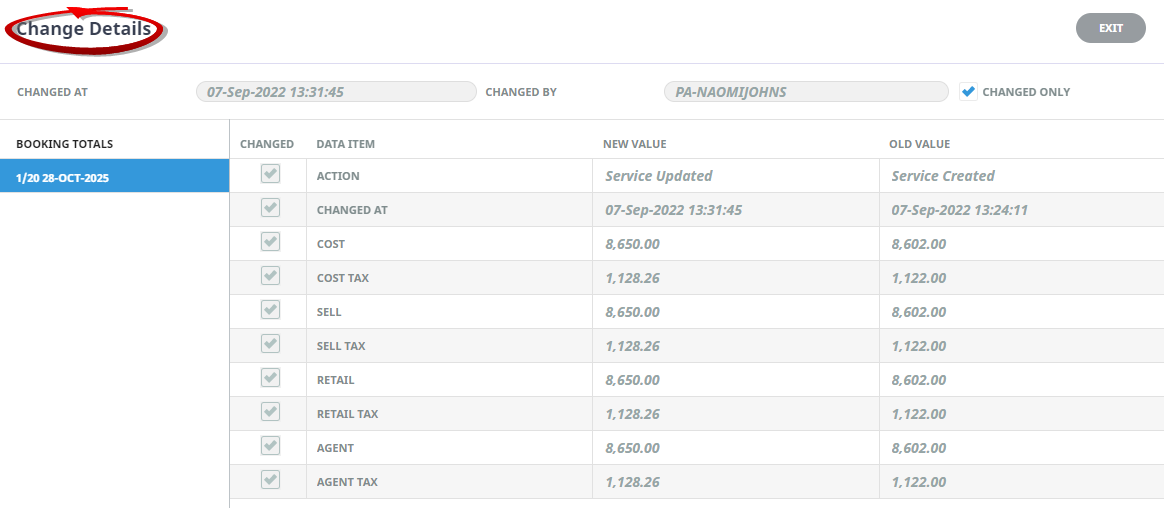
- Old and new values per service for (Cost, Sell, Retail and Agent amounts)
NOTE: The numbering is simply for reference - there is no particular order in which tasks need to be completed and, depending on the booking, they might not all be needed.
The full list is:
View Change History
- Search for and retrieve a booking to work with. If you haven't done this already (see Retrieve an Existing Group Booking).
-
On the
 Change History screen, examine the list of changes from the table.
NOTE: Changes will display in date order most recent first.

-
To view specific change data, click on theaction line to drill-down further.
-
TheChange Details screen will open, the header of the screen identifies the; consultant; date and time the change was made. A list of services will display in the column to the left of the screen.
NOTE: The default view on initial entry will be the Booking Totals view. Change actions per service are available when individual service dates are selected.
-
ClickExit to Exit the Change Details View.

-
ClickExit to Exit the Change History.

About the Change History Fields
Booking Totals
An overall booking totals screen allows users to see the booking value changes for the entire booking. Changed Data Items are identified and listed in a table showing the new and old values for the booking.
Service Change History
Opening a specific change action will display further details of the changes per service.
Change History Filter
Filters can be applied to narrow the search criteria. Filters include 'Changed On' (To and From) fields and an option to filter by Voucher Number.

New Value / Old Value
For each service drill-down opended users will be able to see the value of the service prior to the change and the service value after the change was made.
Change Details are recorded for the following actions:
| Action | Definition |
|---|---|
| Booking Created | When the booking was created. |
| Service Created | Records when the service was created. |
| Current Booking State | Records the status / state of the booking. |
| Booking Updated | Records when a booking has been updated. |
| Service Updated | Records the service line details which have been updated. |
| Booking Totals | Records when booking values have been updated. |
| Booking Deleted | Records if a booking was deleted. |
| Service Deleted | Records if a service was deleted. |