
Agent (Debtor) statements are able to be output in printed form, or sent by email.
NOTE: Before statements can be sent, at least one agent statement message template must have been set up. See the System Setup User Manual for detail on message templates.
Example Agent Statement
%20Statements/Example-AgentStatement-AGALAX.png)
Statement Generation
-
From the Home menu, select
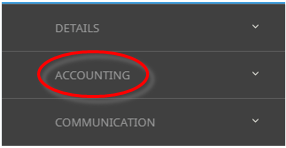
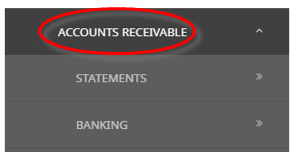
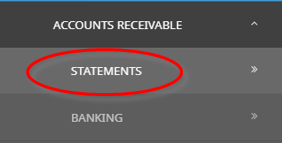
 Financials > Accounting > Accounts Receivable > Statement.
- Click the Home Menu to expand it:

- Click the Financials menu option to expand it:

- Click Accounting to go to the Accounting menu to expand it:

- Click Accounts Receivable to go to the Accounts Receivable menu to expand it:

- Click Statement to go to Statement Generation screen:

- Click the Home Menu to expand it:
- The Statement Generation screen will open with the Filter Tab open.
- On the Filter Tab, enter the required filters to set the debtor search criteria. Selections can be filtered by:
- Agent From/To
- As at Period
- and an option to Exclude Deleted Agents can be selected.
%20Statements/StatementGeneration-FilterTab(i).png)
- Selection is also available, if required by the 6 Analysis Codes attached to the Agent.
- Within the Filter Tab, selection is also available by Agent currency Branch and/or Department. To include all agents, leave these fields blank.
- Select All or Specific Agent Currencies.
- Select the required check box from the following options:
- Include Nil Balance Agents
- Skip Current Nil Balances
- or Skip Future and Current Nil Balances
- Check the completed screen.
-
When selections have been completed, clickSearch to display results.
 Or select theResults Tab. All Agents that meet the search criteria will display under the Results Tab.
%20Statements/StatementGeneration-ResultsTab.png)
- Select All is defaulted. Or, Unselect all and select specific agents to include in the Agent Statement by clicking the requiredCheck-Box(es).
%20Statements/StatementGeneration-ResultsTab-AgentSelection-AGALAX-EDUWAS-GLRBER.png)
- Check the Completed Screen.
-
ClickGenerate to create Agent Statement.

-
TheStatement Generation screen will display.
%20Statements/StatementGeneration-ResultsTab-GenerateModal.png)
-
Select aDocument Format, a Statement Date, and a Document Destination. The Statement Date defaults to the last day of the accounting period in the As At Period field and can be amended if required.
%20Statements/StatementGeneration-ResultsTab-GenerateModal-DocumentFormatSection.png)
-
Select the requiredInclude Transactions by checking the required check-box, and select the Order Transactions By to choose the order in which transactions are to appear.
%20Statements/StatementGeneration-ResultsTab-GenerateModal-IncludeTrans_OrderTransBySections.png)


NOTE: These are the Branch and Department attached to the agent currency record(s), not Booking Reference branch and departments.
About the Statement Generation Fields
- Filter Tab
-
The top (un-labelled) section has the basic selections of:
The Filter screen is in 5 Sections.
Agent From/To
These two fields allow statements to be sent to all agents (leave both of the fields blank); to a selected agent (select the agent code in both fields); or a range of agents (select the first agent code in the From field and the last agent code in the To field), who meet all other selection criteria.
As At Period
Select the debtors accounting period that the statement is valid to.
NOTE: This field allows statements to be produced for previous accounting periods, reflecting the state of the account as at the previous period end.
Exclude Deleted Agents
When this box is checked, those agents that have had the "Deleted" check-box checked (see Accounts User Manual) will be excluded from the statement run even though they may meet the selection criteria.
- Analysis Section
- Currency Branch and Department
- Agent Currencies
- Include Nil Balance Agents
-
Include Nil Balance Agents. This selection will output statements for all agents, regardless of the agent balance. This means that agents with transactions in the statement period that have reduced the agent balance to 0.00 can be output.
- Skip Current Nil Balances (Default). This selection will not output agents whose balance in the current period is nil. Those agents with balances in the current period that reduce to 0.00 in a future period will be output.
-
Skip Future + Current Nil Balances. When selected, only agents that have a balance owing either overdue or current will be output.
Agents can be selected on the basis of the six Agent analysis fields.
The G.L. branch and department codes attached to agents in the Agent Currencies screen (see ). To include all agents, leave these fields blank.
Agents can be selected based on the selling currencies which are attached to them.
Three choices are available:
- Results Tab
By default all agents that meet the selection criteria are tagged/checked for inclusion in the statement run. They can be individually unchecked if not required.
About the Statement Generation - Output Dialogue Fields
%20Statements/StatementGeneration-ResultsTab-GenerateModal-OutputDialogue.png)
Document Format
Select the required Statement document format from the drop-down.
As At Period
The accounting period the statement covers. This was initially selected from a drop-down on the Filter Tab and cannot be changed here.
Statement Date
The date that can optionally be printed on the statement. This date defaults to the last day of the accounting period in the 'As At Period' field, but may be changed here.
Include Transactions
- Include Nil Balance Items. When checked, all transactions for an item that balances to 0.00 will be output.
- Include Nil Balance Transactions (Default). When checked, transactions (within an item) that balance to 0.00 will be output.
-
Include Future Entered Transactions. When checked, transactions that have been entered into the system in an accounting period in advance of the current (statement) period will be output.
-
Include Future Aged Transactions. When checked, transactions that are dated in or prior to the current (statement) period, but whose age period is greater than the transaction period will be output.
NOTE: An item is a collection of transactions relating to a single booking and identified by the Tour Reference.
Order Transactions By
Transactions on the statement may be ordered by:
- The Booking Travel Date or by
- Booking Reference or by
- Booking Name.
An output summary will be displayed once the statements have been output.